

Enhance productivity with Chrome’s vertical tabs and immersive reading mode
Chrome introduces vertical tabs and an immersive reading mode to enhance productivity by improving tab management and providing a focused reading experience.

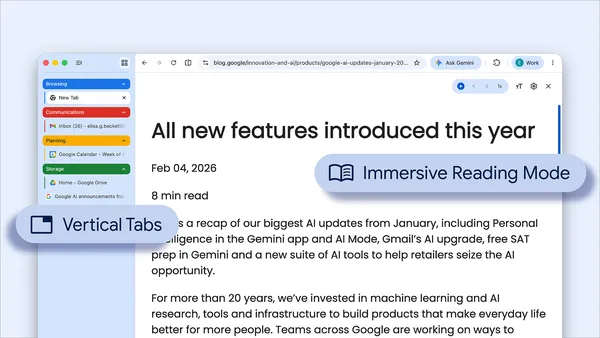
Google Chrome has introduced two innovative features aimed at boosting user productivity: vertical tabs and an immersive reading mode. These additions are designed to provide a more streamlined browsing experience, enabling users to manage their tasks more efficiently.
The vertical tabs feature offers a new way to organize and navigate through your open tabs. Instead of the traditional horizontal layout, tabs are now displayed vertically on the side of the browser. This layout can help users easily view and switch between tabs, especially when dealing with multiple open pages. By making better use of screen space, vertical tabs can reduce clutter and improve navigation efficiency.
In addition to vertical tabs, Chrome has rolled out an immersive reading mode. This feature is designed to enhance the reading experience by eliminating distractions on web pages. When activated, the reading mode strips away unnecessary elements like ads and sidebars, presenting a clean, focused view of the text. This can be particularly beneficial for users who need to concentrate on reading articles or documents online without interruptions.
Both features reflect Chrome’s commitment to providing tools that cater to the needs of its users, helping them work smarter and more effectively. As users increasingly rely on web browsers for both professional and personal tasks, such enhancements are likely to be well-received. These updates are part of Chrome’s ongoing efforts to improve user experience and support productivity.